- The AI Musicpreneur
- Posts
- ⏳The blank DAW screen is killing your creativity
⏳The blank DAW screen is killing your creativity
This $10/month tool lets you skip straight to the music.

The AI Musicpreneur
April 01, 2026
This week, I'm sharing a personal story about why skipping steps always catches up with you. Plus, I've got a way to build custom AI assistants that handle your music admin, and a browser-based tool that turns your ideas into full beats in 5 minutes. Let's get into it.
Last week I went for a long run and overdid it completely.

I'd been running 30 - 45 minutes comfortably. Felt good. Wanted to push. So I went for 1.5 hours. Still recovering. The body wasn't ready for that jump.
It's the same mistake artists make with fan growth. You don't go from 0 to 10,000. You build from 1 fan to 10 to 100. Each stage prepares you for the next.
Progress that skips the middle always costs you on the back end.
Now, let’s cut to the chase:
This week in the AI Musicpreneur: ↓
✍🏼 AI MUSIC PROMOTION CORNER:
How to build custom AI assistants that handle your bios, release rollouts, and social content on command.
🛠️ AI MUSIC PRODUCTION CORNER:
A browser-based AI copilot that builds your track layer by layer in 5 minutes.
📰 And the latest news shaking up the music tech world.
↓↓↓↓↓↓↓↓↓

🛠️ AI MUSIC PRODUCTION CORNER
A full beat in 5 minutes without opening Ableton

You have a melody in your head. You open your DAW. Forty-five minutes later you're still EQing a snare drum and the melody is gone.
Veena CoProducer solves this.
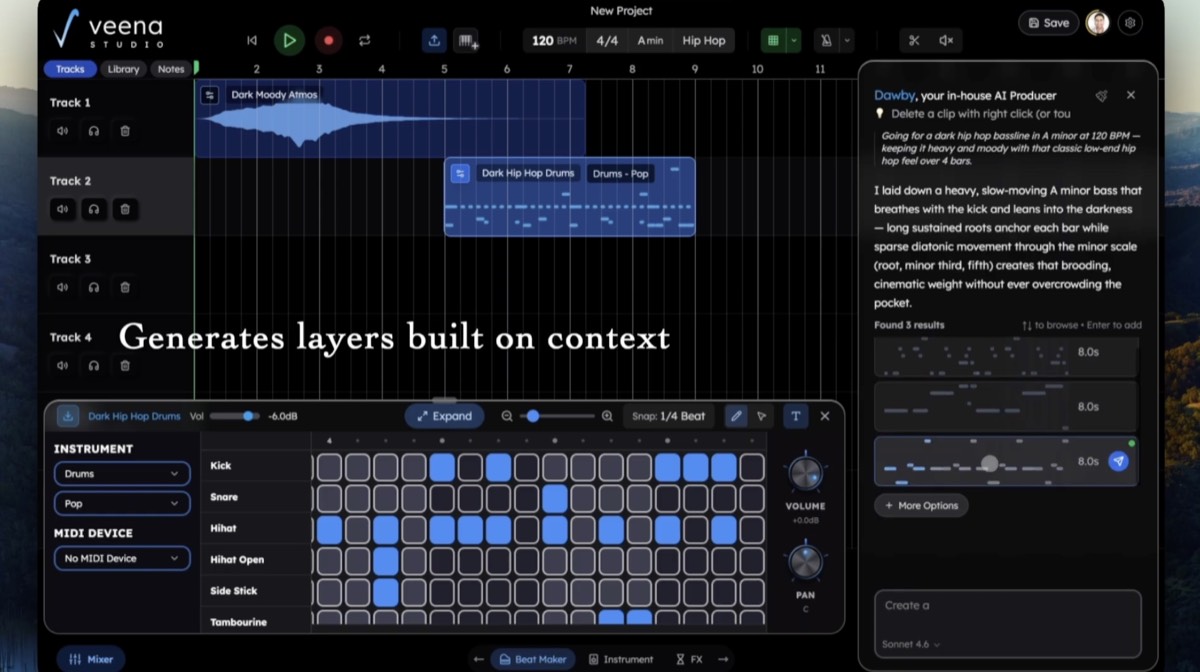
It's a browser-based AI copilot that builds your track layer by layer: beats, bassline, chords, melody, SFX.
You describe what you want in plain English, and it generates each element inside a multitrack timeline. No download, no plugin routing, no blank canvas paralysis.
Here is how to build your first track:

Open daw.veena.studio in Chrome. Sign up or log in. Start a new project.
Type your idea into the chat. Be specific: "mid-tempo neo-soul groove, 85 BPM, warm Rhodes chords, tight kick-snare pattern."
CoProducer generates the first layer (usually drums). Listen to the options it returns and pick the one that fits.
Ask for the next layer. "Add a deep sub bass that follows the chord pattern." It builds on top of what you already approved.
Keep stacking: chords, melody, SFX. At each step you choose from the AI's options, refine with a follow-up prompt, or record your own vocals and instruments directly into the timeline.
CoProducer handles arrangement and mixing: FX chains, tone shaping, and stereo placement. Override anything you don't like.
Export in WAV, MP3, or FLAC. Audio runs at 48 kHz / 32-bit float.
$10/month, single plan, no tiers. The AI never auto-finalizes your track. You stay in the producer's chair.
Try it at veena.studio and build your first track in the browser.
✍🏼 AI MUSIC PROMOTION CORNER
You did not get into music to be your own Marketing department.

You got into music to write, produce, and perform. Instead you're spending 20 hours a week as your own publicist, social media manager, and marketing director.
Claude Skills handles the admin so you can stay in the studio
Skills are custom AI assistants inside your Claude account. You describe a workflow once, and it runs on command. No code. No monthly tool subscriptions. No switching between 6 different apps.
Here is what you can build:
1 - Artist Bio Generator:
Feed it bullet points about your latest project. It writes a press-ready bio in your voice, formatted for Spotify, your EPK, or a booking email. Done in 30 seconds.
2 - 4-Week Release Rollout Planner:
Give it a release date. It maps out every social post, email, and promo task from 4 weeks out to release day. No more scrambling the night before.
3 - Superfan Newsletter Sequence:
It drafts a 5-email welcome sequence for new subscribers. The kind that turns casual listeners into merch buyers and show attendees.
4 - Social Media Hook Creator:
Describe the vibe of your new track. It generates 10 hooks for TikTok or Reels, each tailored to the content style that gets traction on the platform.
Here is how to set up your first Skill:
Sign up or log in at claude.ai.
Click “Customize” in the left sidebar.
Click Skills to open the library where your custom workflows will live.
Hit the "+" icon near the top right, then select Create with Claude.
Describe what you want the Skill to do. Be specific: include the output format, tone, and any details it should always include.
One note on model choice: pick Sonnet 4.6 for quick, single-step tasks (bios, headlines, proofreading). Use Opus 4.6 for multi-step workflows like release rollouts or email sequences.
Build your first Skill at claude.ai and stop doing admin when you should be making music.
↓↓↓↓↓↓↓↓↓
Most musicians spend more time on admin than on music.

Contracts. Emails. Social posts. Promo campaigns. Grant applications.
You didn't start making music to manage a small business. But that's what it became.
I've been thinking about building a system inside Claude that handles most of it for you.
Custom Skills, automated workflows, and templates that run the backend of your career so you can focus on writing and recording.
Rapper Meek Mill put it like this:

"Claude is helping me organize my whole music career and other businesses in days... and it's moving my business forward at a high rate."
I want to show you how to set this up for yourself.
One question:
Would you join a community that saves you 20 hours of admin every week? |
📰 HOT OFF THE PRESS:
📰 LAST WEEK’S TOP 5 AI MUSIC NEWS
Missed last week’s news? I got you. Here are the top 5 AI music news:

WRAP UP
WHAT YOU LEARNED TODAY:
Build custom Claude Skills to automate bios, release rollouts, and social content in seconds
Use Veena CoProducer to turn ideas into full beats in 5 minutes without opening your DAW
Progress that skips the middle always costs you on the back end
We’re at the end!
As Garth said in Wayne's World while slamming his fist on a plate of fries: "We fear change."

The instinct to protect what you built is real.
But the right tools don't take your music away.
They give you more time to make it.
Keep building. One step at a time.
Always rooting for you,
-Chris (The AI Musicpreneur)
How was this week's email? |
Whenever you’re ready, there are 2 ways I can help you:
The AI Fanbase Builder: My flagship course and prompt library endorsed by music industry leaders. The AI Fanbase Builder teaches you step-by-step frameworks for growing your audience, getting noticed on social media, and turning followers into paying fans. Come learn proven strategies to build a thriving music career with AI.
Promote your AI tool to 2,000+ music pros weekly: Put your music brand in my newsletter where musicians, producers and industry pros, including Grammy winners and label executives, are already looking for AI music tools and insights each Wednesday.