- The AI Musicpreneur
- Posts
- ⏳ Edit any clip in your AI music video with a prompt
⏳ Edit any clip in your AI music video with a prompt
Type what's wrong with your clip. This AI chat assistant fixes it:

The AI Musicpreneur
April 08, 2026
This week I'm breaking down how to edit AI music videos without touching a prompt, how to compose full tracks from text and keep control of every note, and the latest news in music tech. Stick around for the lesson I learned standing at the edge of the Alps.
We usually just recover. Last weekend we didn't.

My girlfriend and I had the same weekend routine for months. Short walk, a movie, horizontal by 8pm. We called it rest, but every Monday still felt heavy.
Last weekend we drove to Lindau, an island town on the Bodensee with views of the Alps. We walked for hours. We ate well. We never mentioned Monday once.
The difference hit me on the drive home. Rest brings you back to zero. It replaces what the week took. But a new place, a new input, takes you past zero.
If your weeks feel like a loop, the fix is not more rest. It is a new input.
Now, let’s cut to the chase:
This week in the AI Musicpreneur: ↓
✍🏼 AI MUSIC PROMOTION CORNER:
Edit AI-generated music video clips in plain English using Neural Frames' new chat editor.
🛠️ AI MUSIC PRODUCTION CORNER:
Compose full tracks from text prompts with Delphos Copilot, then edit every note yourself.
📰 And the latest news shaking up the music tech world.
↓↓↓↓↓↓↓↓↓

✍🏼 AI MUSIC PROMOTION CORNER
Edit any clip in your AI music video by typing what to change

You generate a clip. The character's hair is wrong. You open the prompt, scan a paragraph, find the phrase you think controls it, change it, regenerate. It's still wrong.
You're not a prompt engineer. You're a musician trying to finish a music video.
Neural Frames fixes this with its March 2026 Autopilot update.
The chat editor replaces prompt editing with plain-language input. You type what to change. The AI updates the clip.
Edit history with rollback is automatic.
Here is how to edit a clip without re-generating the entire scene:
1. Open your Autopilot project and click any clip in the timeline to open the clip panel.

2. Click the chat icon to open the chat interface.
3. Type your change in plain English. Example: "Please add a Delorean poster on the left wall please."

4. Add "keep the rest the same" to every starting image edit. Without it, the AI may reinterpret the whole clip.

5. To change how a clip moves, write "edit the motion" explicitly. Without that phrase, the AI defaults to editing the starting image.
6. If the output drifts after several edits, click the history icon on the clip and restore an earlier version.
Limit chat edits to 3 or 4 turns per clip before checking rollback.
Each edit layers context onto the previous state. After 4 turns, output can drift from the original.
Check out Neural Frames here.
🛠️ AI MUSIC PRODUCTION CORNER
77% of producers fear AI kills creativity. This AI Copilot does the opposite:

Use code “AIMUSICPRENEUR” to get $25 in credits when you sign up.
You type a prompt into an AI music tool. It spits out a finished track. You can't touch a single note. You either use it or start over.
Delphos Copilot works differently.
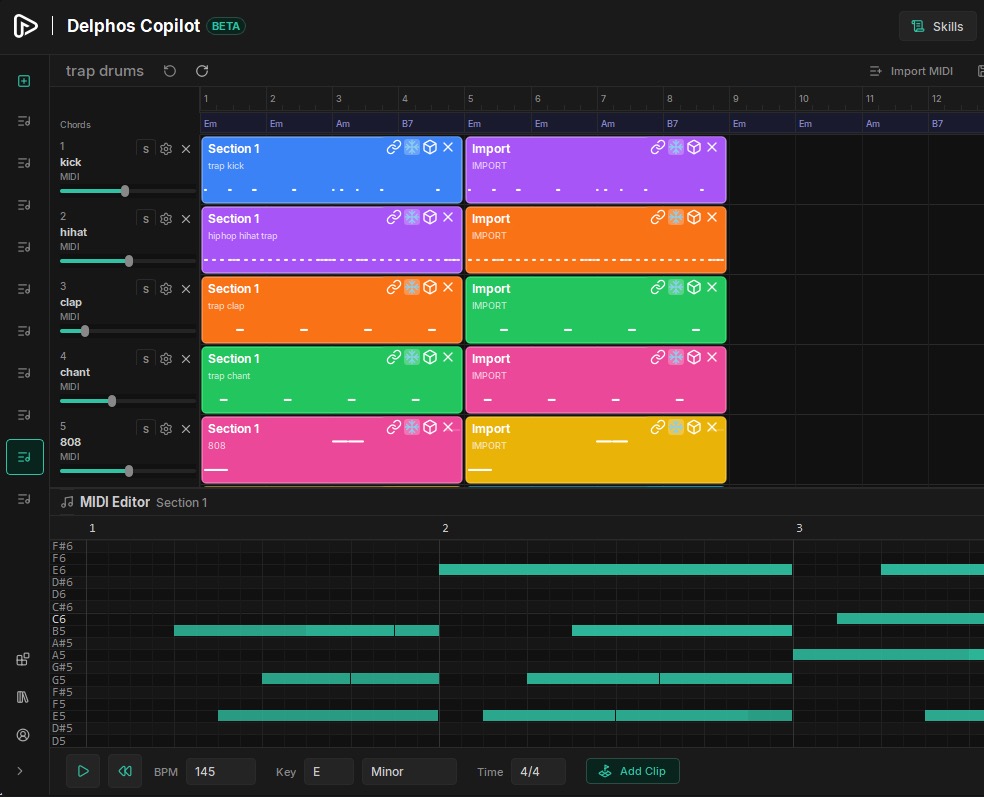
It's a downloadable composition workstation (free on Windows, Mac coming) that generates MIDI from text prompts and hands control back to you at every step.
You build a composition clip by clip. Each clip is editable.

When you're done, render the MIDI into audio, export stems, or push to your DAW.
Here is how to compose your first track in Copilot:
1. Download and install the free Windows app at delphos.ai. Create an account.
2. Ctrl+Click anywhere on the timeline to place a clip. Drag the edge to set the length.
3. Click the cube icon on the clip. Type a natural language prompt: "jazzy bassline", "chord progression in D minor", "driving hi-hat pattern". Set the element type: MELODY, BASS, CHORDS, DRUMS.
4. Hit Generate. Copilot creates the MIDI clip.
5. Open the piano roll to edit individual notes. Re-prompt if the result isn't right.
6. Render the MIDI into audio or export stems via the Export Audio / Export Stems buttons.
Credits cost $0.05 each. The free tier includes 100 credits per month.
Want to get started today? Here’s how to get $25 in credits:
Create an account on delphos.ai with your email
Go to “Buy Credits” to use my promo code “AIMUSICPRENEUR” to get $25 in credits to get started today.
Happy composing 🙂
📰 HOT OFF THE PRESS:
📰 LAST WEEK’S TOP 5 AI MUSIC NEWS
Missed last week’s news? I got you. Here are the top 5 AI music news:

WRAP UP
WHAT YOU LEARNED TODAY:
- If your weeks feel like a loop, the fix is not more rest. It is a new input, a new place, a new experience to break the pattern.
- When editing clips in Neural Frames' chat editor, always add "keep the rest the same" to your message and limit edits to 3 or 4 turns before using rollback.
- Delphos Copilot generates MIDI from text prompts but lets you edit every note in the piano roll, giving you full control over the final composition.
We’re at the end!
Ace Ventura never second-guessed himself. He committed to every weird idea with full confidence, grinned, and moved on to the next one. As a musician working with AI tools, you'll get strange outputs. The ones who finish projects are the ones who say "alrighty then," adjust, and keep going.
"Alrighty then."

Stop overthinking every imperfect result. Accept it, tweak it, and move forward.
Always rooting for you,
-Chris (The AI Musicpreneur)
How was this week's email? |
Whenever you’re ready, there are 2 ways I can help you:
The AI Fanbase Builder: My flagship course and prompt library endorsed by music industry leaders. The AI Fanbase Builder teaches you step-by-step frameworks for growing your audience, getting noticed on social media, and turning followers into paying fans. Come learn proven strategies to build a thriving music career with AI.
Promote your AI tool to 2,000+ music pros weekly: Put your music brand in my newsletter where musicians, producers and industry pros, including Grammy winners and label executives, are already looking for AI music tools and insights each Wednesday.